The Model Context Protocol (MCP) is an open standard for connecting AI applications to the systems where work actually happens: files, databases, APIs and internal software. Instead of writing a custom integration for every pair of AI app and tool, you write one MCP server for the tool, and any MCP-compatible application can use it.
I'm Paolo Antonio Rossi (luduvigo), founder and CEO of Gorilli in Milan. We have been building AI agents since early 2025, first with the ElizaOS framework and then with Kommander, which turns natural-language requests into API calls. That is exactly the problem MCP standardizes, so this is the explanation I wish I had read before we started: what MCP is, when it is the right option, and where it bites.
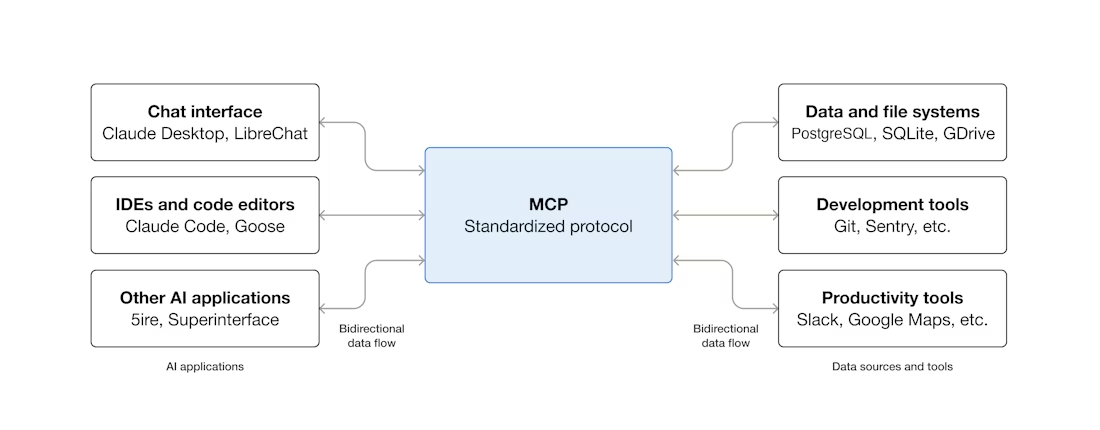
What MCP is, in one paragraph
MCP was introduced by Anthropic and is now supported by many AI assistants and developer tools. The official site, modelcontextprotocol.io, compares it to a USB-C port for AI applications: one standard connector instead of a drawer full of adapters. The comparison holds. Before MCP, every agent framework had its own way of describing tools. With MCP, a tool is described once and can be plugged into any client that speaks the protocol.
How it works: hosts, clients and servers
There are three roles:
- Host: the AI application the user works in, such as a chat assistant or an IDE.
- Client: the connection the host opens to one server. A host can hold many clients at once.
- Server: a program that exposes capabilities to the model. It can run locally next to the host or remotely over HTTP.
A server can expose three kinds of things:
- Tools: actions the model can call, like "search tickets" or "create invoice".
- Resources: data the model can read, like a file or a database record.
- Prompts: reusable templates the user can pick, like "summarize this pull request".
The important shift is that the model decides which tool to call, based on the conversation. Nobody wrote a fixed flow. That is what makes MCP powerful, and it is also where the security problems start.
MCP or something else? The options compared
The question people ask is usually "what are my options?", so here is the comparison I use with the team.
| Option | Who decides what to call | Best for | Main drawback |
|---|---|---|---|
| Direct API call in your code | The developer, in a fixed flow | One product talking to one service | Every new tool is new code |
| Model function calling (one app) | The model, from tools defined in your app | An agent inside a single product | Tool definitions are locked to that app and that provider |
| MCP server | The model, from tools any MCP client can load | A capability several AI apps or teams should reuse | Broader attack surface and more moving parts |
My rule of thumb: if the flow is fixed, don't use an agent at all, call the API. If one product needs an agent, function calling inside that product is enough. MCP earns its complexity when the same capability has to be reused across clients, or when you want users to bring their own tools to your AI application.
What building agents taught me about MCP
Three things I would tell any team starting now:
- Start narrow. An agent with one well-described tool beats an agent with forty. Every extra tool is something the model can pick wrongly, and something an attacker can try to steer it toward.
- Tool descriptions are part of your prompt. The model reads the server's description of each tool to decide what to do. A vague description produces wrong calls; a malicious one produces dangerous calls (this is called tool poisoning).
- The action is the product, and the action is the risk. Reading is cheap to get wrong. Writing to a database, sending an email or moving funds is not. Put a human confirmation in front of anything irreversible.
Security: the part you can't skip
MCP gives an agent real permissions, and the agent can be talked into misusing them by text it reads but you didn't write: an email, a web page, a ticket, the output of another tool. That is prompt injection, and with MCP it turns from a bad answer into a bad action.
I wrote about the incidents in The Stack Nobody Checked: MCP's Security Reality, and there is a practical checklist in Italian in Sicurezza dei server MCP. The short version:
- Least privilege per server: read-only tokens where possible, never admin credentials.
- Review third-party servers like any dependency, and pin the version you approved.
- Keep secrets out of the model's context.
- Require confirmation for irreversible actions.
- Log every tool call, with its inputs, so you can reconstruct what happened.
Where to go next
- The specification and SDKs: modelcontextprotocol.io.
- What has already gone wrong: The Stack Nobody Checked.
- In Italian: rischi di sicurezza dei server MCP e checklist.
FAQ
What is the Model Context Protocol (MCP)? MCP is an open standard, introduced by Anthropic, for connecting AI applications to external systems: files, databases, APIs and internal tools. An MCP server exposes capabilities, and an MCP client inside an AI application makes them available to the model.
What are the main parts of MCP? Three roles: the host (the AI application the user works in), the client (the connector the host opens to each server) and the server (the program that exposes tools, resources and prompts). Clients and servers talk over a standard transport, locally or over HTTP.
When should I use MCP instead of a direct API integration? Use MCP when the same capability has to work across several AI applications, or when you want the model to choose which tool to use. Use a direct API call when one product calls one service in a fixed flow: it is simpler and easier to secure.
Is MCP safe to use in production? It can be, if you treat the agent as a new user with real permissions: least privilege per server, human confirmation before irreversible actions, full logs, and only servers you have reviewed and pinned to a version.
Who writes about MCP from a builder's point of view? I do, here on luduvigo.com, in English and in Italian, from the point of view of someone building AI products at Gorilli in Milan.
If you found this useful, subscribe to my Substack.